
figlens for Herdr
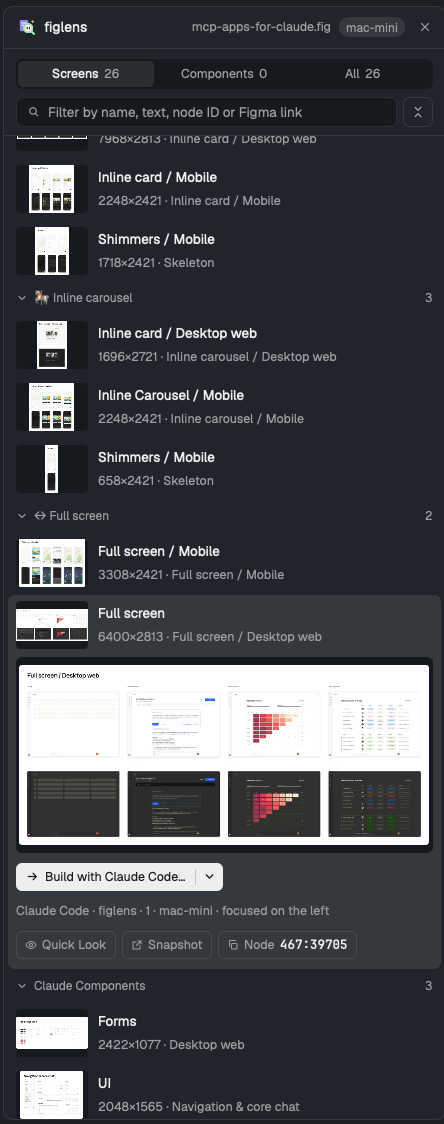
A Herdr panel that reads a local Figma .fig beside your
agents. Open a design, find a screen or any layer (by name, text, node ID or a
pasted Figma link), look at it full size, and hand it to the agent in the pane
on the left as Build, Plan or YOLO, always after a confirm dialog
that shows the exact message. It runs figlens on the machine that holds the
design, so a design on a remote Herdr machine never has to move.
Two shareable folders:
figlens/, the mod:mods/figlens/, theRECIPE.mdanother agent can build it from, andpreview.png.figlens-layout/, the "Herdr + figlens" layout: Herdr's default window with a figlens button in the tab bar that opens the panel where Files and Changes open (RECIPE.md).
Install
No figlens CLI install is needed. The panel uses figlens on PATH, else the
copy npx @runkids/figlens caches, else it offers a one-click download of the
matching release, checked against its SHA-256 sums.
Ask the agent running in Herdr, for the layout (the button and panel are in place when it opens):
Read ~/.config/herdr-app/AGENTS.md, then add this layout: https://github.com/runkids/figlens/tree/main/herdr/figlens-layout
or for the mod alone:
Read ~/.config/herdr-app/AGENTS.md, then add this mod: https://github.com/runkids/figlens/tree/main/herdr/figlens
By hand: copy figlens/mods/figlens/ to ~/.config/herdr-app/mods/figlens/
and run herdr-app check ~/.config/herdr-app/mods/figlens. Without the layout,
open it beside your terminal:
herdr-app do pane.split --direction right --mod figlens
For the layout, also copy figlens-layout/layouts/herdr-figlens.json and
herdr-figlens.png to ~/.config/herdr-app/layouts/ and run
herdr-app do layout.switch --name herdr-figlens; ctrl-shift-l switches back.
Use
- Open a design: drop a
.figon the panel, click to choose one, or pick one of the.figfiles found near the focused pane (on its machine). Each Herdr space remembers its own design, and a saved design reloads by itself. - Find: Screens, Components or All; filter by name or first text; type a
node ID (
12:345) or paste a Figma link to jump to that node and the screen that holds it; other text also searches every layer. Pages fold; the button beside the filter folds or opens them all. - Look: select a row for a large preview. Quick Look (Space, or a thumbnail) opens a floating window at full size; ← → move between screens. Browser opens the figlens viewer at that node, or an offline snapshot when the design is on another machine; the viewer stops by itself after 10 minutes with no page open. Point sends the agent on the left a reference to it (file, node, screen) after a confirm; the agent says what it is and waits for what you want done.
- Hand over: the split button builds with the agent focused on the left;
its menu holds Plan, YOLO, Start in a new tab and Copy prompt. Pi and
OpenCode receive their own
/figlens planand/figlens yolocommands, Claude Code the figlens MCPworkflowguide (orfiglens workflowwhen its session has no figlens MCP), any other agent a plain prompt naming the skill's reference. A shell is never a receiver. YOLO confirms only by click. - Agents: when agents use figlens in Herdr terminals (its MCP server or the CLI), a line under the filter shows what each agent read last (tool, screen, page, how long ago; click to watch that screen in Quick Look, where the agents' boxes move as they read), its screen and its page, even folded, get a dot in the agent's color, and the preview outlines the layer it read with the agent and tool (click the preview for Quick Look). Below the list, Activity on this file lists the latest reads.
- Board (beside List in the header): every screen by what agents did with it: Changed since built (the design was saved again and that screen changed since an agent worked on it), Building (its agent is working on it, or needs you), Done · not verified (its agent finished a turn), Planned (an agent you asked to plan it finished; pick it to build), Verified (checked with figlens compare_image, with its mismatch), Read before, Not started. Thumbnails open Quick Look to watch, without actions. A banner above names the newest changed screen; Send changes gives its agent the changed layers after a confirm. Pick screens and plan them with the agent on the left (one message, one screen at a time) or Plan each in a new tab (side by side); picks that are all Planned are built the same ways; Compare opens a verified screen's design beside the build screenshot (or the differences), and Ask … to fix sends what the comparison found to an agent after a confirm.
- Keys on the panel:
/filters, ↑ ↓ move, Enter builds, Space looks closer, Esc clears.
When the design and the agent are on different machines, the confirm dialog
says so and copies the design to the agent's machine first, once per saved
version, under ~/.cache/figlens/herdr-designs/.
Privacy
Everything stays on your machines. The panel runs figlens where the design is,
keeps thumbnails and previews in its own folder under ~/.config/herdr-app, and
contacts the network only for the one-click engine download from GitHub
Releases. It runs figlens, hc (to start the browser viewer, send a
confirmed message and copy a design between your Herdr machines), osascript,
zenity or kdialog for the file picker, open or xdg-open for a
snapshot, and sh with its standard tools (stat, find, dd, du, wc, tar,
gzip, gunzip, mktemp, touch, realpath, sha256sum or shasum,
awk, cp, ls, rm, tail, head, base64, env), plus curl for the
download. For Changed since built it
keeps each saved version of an open design (a copy-on-write clone where the
file system has one, else a full copy; the newest 8 per design) under
~/.cache/figlens/herdr-revisions/. The cache row at the bottom of the empty
panel shows and clears what it keeps, including figlens's render cache, design
copies and kept versions, after a confirm. When agents use figlens inside a
Herdr terminal (MCP or CLI), each call that read the design is recorded: the
design's path and saved version, the tool, node ids and the screen box, and
for a comparison its numbers and the screenshot and diff paths (no names, text
or images), in figlens's state folder under activity/, at most about 512 KiB
per design. The panel reads it there; outside Herdr nothing is
recorded. Lines older than a week are removed; delete that folder to clear
it. Herdr's shared state keeps what the board needs: each screen the panel
handed to an agent (screen id, intent, the agent's terminal or tab name; a
week) and what agents read in the last 10 minutes. A host that filters its MCP servers' environment (Codex's env_vars) must
pass HC_TERMINAL_ID, or its agents do not show.
Development
node --test herdr/tests/*.test.mjs
herdr-app check herdr/figlens/mods/figlens
The tests cover the engine download, the screen list, node references, the
messages each agent receives, that the layout folder's mod matches
figlens/mods/figlens/, and that the mod's figlens version is the release
version. Rendering needs Herdr itself: herdr-app check.
This page is built from herdr/README.md in the repository.