
Build Figma screens in Pi from a local .fig
Save the design from Figma, put it next to your code, describe the screen. Pi finds the frame, reads layout, text and assets, and builds it with your project's components. No Figma app, login or API calls. Works on a remote machine.
The same package has independent OpenCode V2 and OMP entries with their own tested limits. Pi keeps its existing commands and runtime registration.
Install
Requires Pi 1.3.0+. One package ships the CLI, MCP server, viewer and agent skill:
pi install npm:@runkids/figlens
Restart Pi or run /reload. Run Pi from the project you want to build in. The extension registers the figlens MCP server automatically; an existing figlens server in your Pi MCP settings takes precedence. The first launch downloads and verifies the native binary. Package page.
Ask for the screen
In Figma, File > Save local copy → design.fig in your project. Then:
Build the task board from ./design.fig.
Use this project's existing components and assets. Show me the result
and check it against the design.
Pi searches nested screens and resolves node IDs itself. If several frames match, it asks with recognizable names and sizes. React, Vue, Svelte and plain HTML use the same flow. The packaged figlens skill has Pi compare the running UI with the design, verify fonts and images, run project checks and fix confirmed differences, then report what it could not check.
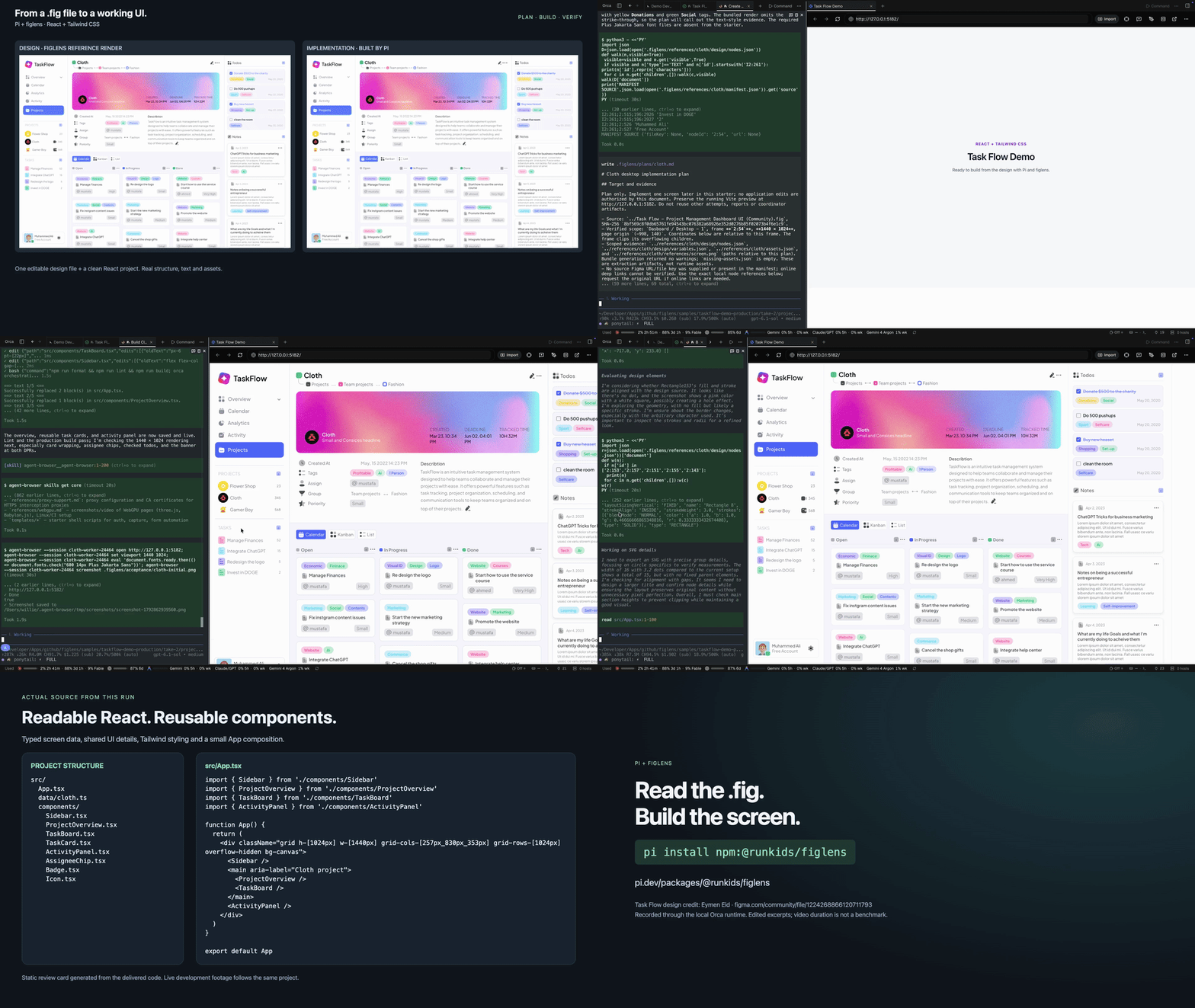
Looping GIF at 3× the edited video’s playback speed. Click it for the full 78-second video.
78-second demo: /figlens plan on one dashboard frame, built with React and Tailwind CSS, checked against the live browser. Edited time-lapse, not a benchmark. Design credit and notes.
Commands
| Command | Does |
|---|---|
/figlens plan [request] |
Inspect the design and relevant code, write a plan. No edits |
/figlens yolo [request] |
Plan, implement, verify, then clean up its own temporary plan and exports |
/figlens open [description] |
Find a design from a file, screen name, purpose or visible text |
/figlens preview [description] |
Start the local viewer and return its link |
/figlens map |
Propose reusable component matches for the current design |
/figlens review |
Accept, edit or skip pending component mappings |
/figlens status |
Show the manual selection and mapping states |
/figlens close |
Stop the viewer and clear the manual selection |
None of these is required to build a screen. A plain request does the whole job.
Plan
/figlens plan Plan only the homepage hero from ./design.fig. Include existing component reuse, image delivery and acceptance checks.
A small region gets a small plan; several pages get an outline with the next slice detailed, or every slice detailed when you ask for the whole plan first. Without arguments it uses the task in the conversation and asks for missing source or scope. Saved plans go to .figlens/plans/<scope>.md (or .figlens/plans/<design>/<scope>.md when several designs are involved) unless the project has its own convention. The same planning workflow works through the skill in other agents.
YOLO
/figlens yolo Implement only the task-board header from ./design.fig. Follow existing components and styles. Compare it with the design and run the relevant project checks.
Loads the YOLO workflow: temporary plan, implementation, checks, corrections, then cleanup of that run's own files and processes only: its plan, the scratch files in its export directory (the verification summary and final screenshot stay) and the dev servers or browser sessions it started. Design departures, such as darker text for contrast, are listed in the report. Failed, interrupted or blocked work keeps its plan and exports. Existing plans and notes stay intact. Host permissions still apply; read the final report for the actual verification outcome.
Preview
/figlens preview ./design.fig
/figlens preview The homepage quick-entry card in ./design.fig
An existing path starts the viewer immediately. A description makes Pi resolve the file and screen first. The link is returned, not auto-opened; keep Pi running while you use it. /figlens close or session shutdown stops the viewer.
Component mappings (optional)
Save reusable matches between this design and our existing components.
Inspect the real imports, props and usage. Leave proposals for me to review.
Then /figlens review lists every pending proposal in the project with its source frame, implementation file, import, usage, rationale and conflicts. Accept, edit or skip. Decisions live in .figlens/component-mappings.md; commit it to share them. A mapping is reused when the same component and variant structure appears again, marked stale when its recorded files change, and left unmatched for a new variant. Non-interactive modes leave proposals pending.
20-second mapping demo (v0.3.0, edited, generation not timed) · recording notes.
Advanced
Source checkout. Install a native figlens binary or set FIGLENS_BIN, then:
pi -e /absolute/path/to/figlens/pi/index.ts
# or save it in Pi's settings:
pi install /absolute/path/to/figlens
Manual selection. /figlens open "./design files/mobile.fig" --frame 12:345 saves a known node and attaches a reference image (PNGs in .figlens/previews/, keep them out of Git). The legacy /figlens frame [ID] searches within that saved file. The selection is restored for manual commands next session; it is not injected as design context. /figlens close clears it and keeps mappings.
Searching a design. Ask Pi to find copy or a screen in a .fig: it searches the file directly and stores nothing. For repeated searches, ask it to enable an index for that design and a scope (for example "enable an index for ./design.fig, whole file"). With no setup command, Pi calls the MCP index tool to prepare a local index of that scope in the figlens state directory, polls jobs until the build succeeds, and from then on searches it by workspaceId and node set to the chosen scope and opens results with inspect, also after a restart or from another host. Pi has no built-in tool permissions: the MCP index tool declares destructiveHint: true and jobs declares it changes state, so a Pi permission extension can confirm them, and the shared skill tells the agent to reset only on your explicit request. Indexes go to the figlens state directory, or to a location an earlier --storage prepare remembered; the registered server has no --storage-root, so a new custom storage is refused. To allow one, add your own figlens server to Pi's MCP settings with the arguments mcp --storage-root /absolute/dir and run /reload; it takes precedence over the registered one.
Finding usages. Ask Pi where a component, variable, style or image is used: the agent calls the MCP usages tool with the exact layer or resource id, on the .fig directly (stateless) or, once an index is enabled, by workspaceId, the result's sourceId and the prepared scope; it never prepares, widens or resets an index for it. For a library component, style or variable, it passes library {kind, namespace, key}, taken from the library field of an outgoing usages result on a layer that uses it, with workspaceId instead: the layers in every visible prepared source whose cached copy uses it, with the definition left unresolved. Results carry exact refs, a snapshotId and coverage; a hidden-layer exclusion or a source that changed is reported, not read as "unused". It changes nothing, so it needs no confirmation.
Searching by meaning. Search by meaning or across languages needs an optional local model profile that you download yourself; figlens never downloads one. Ask Pi to list or check it: the agent calls the MCP models tool with list or status, then configure with the profile and the folder you downloaded (inside the server's --root folders when it has any), and searches with mode semantic or hybrid. Without a profile semantic is mode_unavailable and hybrid answers with text results. configure and remove change only the profile record under the figlens config folder; remove keeps the model files.
Following changes. Ask Pi to follow a design's changes, which opts in to that scope's index and history: the agent prepares the scope when no index covers it, then calls index track with the workspace and the scope, which builds a baseline as an index rebuild does, then subscribes with watch subscribe, reads changes with that subscriptionId and acknowledges each page it handled with watch ack; watch unsubscribe stops following, and untrack, only when asked, stops recording for everyone and keeps the history. watch subscribe with sources (visible or up to 10 sourceIds) instead of sourceId saves a search, or with library a library item's uses, over that fixed set; removing a member disables it, so unsubscribe and subscribe again. A tracking entry with refreshRequired means the file changed since its last build and index refresh records the change; an empty page never proves the file unchanged. Asking it to watch that scope runs watch start, which holds a lease while its figlens server runs, so each save is recorded without index refresh; stop or the session's end releases it, and the last release lets the shared background runner exit. changes changes nothing; track, untrack and the watch actions write only that workspace's database and never reset it, and start also launches that runner. Before each prompt Pi checks the subscriptions and consumers this session subscribed to or acknowledged (kept in the session file, so a resumed session keeps them) with a read-only changes, four per prompt under one 4 s deadline, and adds what it found to that run's model calls as data, without saving it in the session: unread revisions or evaluations (a baseline is marked as no design change), refreshRequired, a tracking state or evaluation that is not current, and targets it could not check with the binary's recovery. The status line says when design context may be stale; the note never acks or grants new authority, and with no subscribe or ack nothing runs.
Searching by image. Ask Pi to enable visual indexing for the design and scope: the agent calls index with action visual on the prepared scope and polls jobs. It then searches by workspaceId with an authorized local PNG in image, or an exact result reference in imageRef, and optional pixel crop; adding text uses mode hybrid. Hash matching works without a model; optional siglip-base configuration through models adds broader visual similarity. Query images are never stored, and similarity does not prove component identity. The live viewer offers the same image, crop and mode controls.
Comparing revisions. Ask Pi what changed between two saved copies of a design: the agent calls the MCP diff tool with old and file (local paths) and pages with nextCursor. Layers match by exact id and type only; unknown means a side stopped or left that layer unexpanded, not that it was removed. It reads both files and writes nothing.
Agent tools. The MCP workflow tool exposes on-demand build, audit, image, planning and opt-in YOLO guides from the same skill sources used by the commands above. For an existing UI, ask Pi to compare it with the design; the shared skill routes to workflow(topic="audit"), with no separate audit command. Static review and screenshot comparison are reported separately; fixes require a fix request. It returns guidance only; the current agent performs the authorized work with its project/browser tools. Besides the design tools (tree, find, search, usages, inspect, nodes, variables, bundle, export), the extension adds:
| Tool | Purpose |
|---|---|
figlens_preview |
Start a session-owned loopback viewer for file and optional node; return its URL |
figlens_bindings |
Read instances and approved/pending/stale mappings; 20 per page, limit 1–50 |
figlens_propose_bindings |
Save 1–20 pending candidates with target, import, usage, rationale, checks and issues |
Both binding tools take file + frame and do not change the manual selection. The extension runs with Pi's filesystem permissions; it is a workflow aid, not a security boundary.
Print/RPC modes. Design reading works without a picker. /figlens plan dispatches a model request; RPC clients wait for the final result, one-shot print clients send a normal planning prompt instead. A one-shot process cannot keep the viewer alive.
Troubleshooting.
- Binary unavailable: npm installs use the bundled launcher; source installs need
figlenson PATH orFIGLENS_BIN. - Stale proposal: ask for a new candidate after design or code changes; approval refuses changed evidence.
- Guide modified or malformed: the extension refuses to overwrite invalid state. Restore
.figlens/component-mappings.mdfrom Git. - Another writer: remove
.figlens/.mapping-lockonly after the other Pi session has stopped. - Duplicate skill name: if another installed skill is also called
figlens, remove it so the package's instructions load.
Maintainers: wiki/pi.md.
This page is built from pi/README.md in the repository.